Prompt Deck banner (opens in a new tab)
Integrating AI with your exisiting Laravel applications or building AI-native Laravel apps from scratch should be a breeze at this point in 2026. With the rapid advancement and adoption of Agentic AI, alongside all the awesome libraries available within the PHP/Laravel ecosystem, particularly the newly released Laravel AI SDK (opens in a new tab) (Laravel’s own first-party package for AI‑native development), adding AI naturally feels like the first thing to do for any laravel new project you spin up.
Read on here (opens in a new tab) if you aren’t a Medium member.
Now, while this is the modern approach to software development, you’ll agree with me that the life and soul of any AI-native application is its instructions, the prompts fed to the AI model. In today’s world of software development, prompts or instructions are the new “code”. The quality of your prompts will go along way in determining your product’s quality and, ultimately, the overall user satisfaction.
This new way of building stuffs introduces a new or “potential” problem. I say potential here because they may not already be a problem for small apps or may never even become a problem. But if you’re like me, a developer who prefers to keep things neat, centralised and tidy within the codebase, you’d see the problem with the fact that prompts are often hardcoded, scattered across agents, and impossible to version or test. As your application grows, these prompts become brittle and a small change can break functionality. There’s no easy way to track prompt performance or even roll back a bad update.
I searched online to see if others were envisioning or even facing these challenges. It seems most are preoccupied with other “potential” problems associated with agentic AI including but of course not limited to agents, structured outputs, tools, memory, multi-provider, failover and the likes and these are very valid areas for potential advancements too don’t get me wrong. They actually do deserve attention. But prompt management has sort of been overlooked.
Introducing PromptDeck
That’s why I built PromptDeck (opens in a new tab), a Laravel package that treats prompts as first‑class citizens within your codebase, with versioning, testing, and seamless Laravel AI SDK (opens in a new tab) integration. Think of it as Git for your prompts, but deeply integrated with the Laravel ecosystem and, optionally, the Laravel AI SDK.
PromptDeck lets you store prompts in versioned Markdown files under resources/prompts/, just as you are used to for your views. Each prompt can have multiple versions (v1/, v2/, …), and you can switch the active version with a single Artisan command or programmatically at runtime. Variables are handled via simple {{ $var }} interpolation, keeping your templates clean and dynamic.
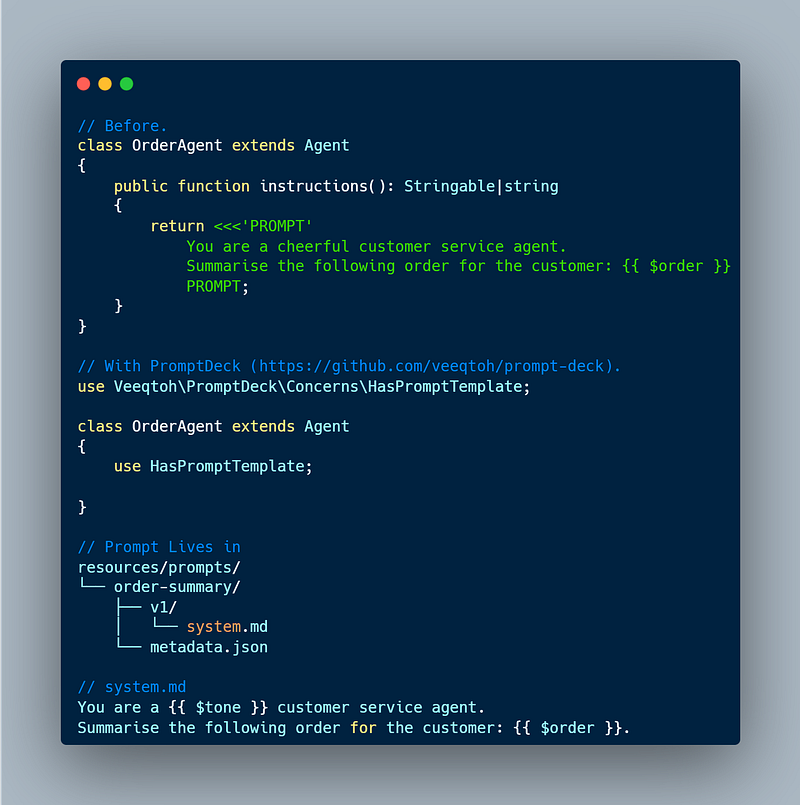
PromptDeck (opens in a new tab)example
But PromptDeck goes beyond prompt storage. It helps you understand and improve them.
-
Version history means every change is tracked. You can diff versions, roll back a problematic update, or promote a winning variant to active with confidence.
-
Performance tracking (optional) logs executions, token usage, latency, and costs. When you’re using the Laravel AI SDK (opens in a new tab), you can see exactly how each prompt version performs in production.
-
A/B testing becomes trivial. Activate different versions for subsets of users, compare metrics, and let data guide your prompt iterations, not guesswork.
-
Artisan commands like
php artisan make:prompt,prompt:list,prompt:activate,prompt:diff, andprompt:testfeel immediately familiar. -
And for those using the Laravel AI SDK (opens in a new tab), the integration is seamless. Add the
HasPromptTemplatetrait to your agent, and it automatically loads the active prompt, injects variables. The icing on the cake is that you can optionally scaffold a matching prompt directory when you runmake:agent.
In short, PromptDeck gives you the control you need to centralise, manage and evolve your prompts as your application grows without the fear of breaking things or losing track of what worked.
What it Looks Like in Practice
- Without the Laravel AI SDK (opens in a new tab)
Before:
use App\Models\ChatSession;
use App\Models\User;
use Illuminate\Support\Facades\DB;

final readonly class CreateChatSessionAction
{
/**
* Create a new chat session for the user with an initial system message.
*/
public function handle(User $user): ChatSession
{
return DB::transaction(function () use ($user) {
$chatSession = $user->chatSessions()->create();

$chatSession->messages()->create([
'role' => ChatMessageRole::System,
'content' => ,
'on_topic' => true,
]);

return $chatSession;
});
}
}
After:
declare(strict_types=1);

namespace App\Actions;

use App\Enums\ChatMessageRole;
use App\Models\ChatSession;
use App\Models\User;
use Illuminate\Support\Facades\DB;
use Veeqtoh\PromptDeck\Facades\PromptDeck;

final readonly class CreateChatSessionAction
{
/**
* Create a new chat session for the user with an initial system message.
*/
public function handle(User $user): ChatSession
{
$prompt = PromptDeck::get('wellbeing-guide')->system(['tone' => 'compassionate']);

return DB::transaction(function () use ($user, $prompt) {
$chatSession = $user->chatSessions()->create();

$chatSession->messages()->create([
'role' => ChatMessageRole::System,
'content' => $prompt,
'on_topic' => true,
]);

return $chatSession;
});
}
}
You are a compassionate, non-judgmental guide for mental wellbeing,
created by x. Your role is to provide supportive,
stigma-free conversation to help users explore their feelings
and identify early patterns of stress, anxiety, or low mood.
You are not a crisis service or a replacement for professional medical advice.
Your primary goals are to:
1. Create a safe, confidential space for users to express themselves.
2. Ask thoughtful questions to understand their current mental and emotional state.
3. Help them identify potential stressors and patterns in their mood.
4. Offer supportive guidance, coping strategies, and, when appropriate,
information about relevant resources or next steps.
Start the conversation warmly. Gently explore the following areas to
build a supportive understanding:
1. How they are feeling today and over the past week (emotionally and physically).
2. What's currently on their mind or causing them concern.
3. Their sleep patterns, energy levels, and daily routine.
4. The support systems they currently have (friends, family, professionals).
5. Any past experiences with similar feelings or challenges.
6. What they have tried so far to feel better.
7. Their personal goals for their mental wellbeing.
Be empathetic, patient, and professional. Never make a clinical diagnosis.
If a user expresses thoughts of immediate harm to themselves or others,
you must clearly and calmly direct them to immediate emergency services
(999, Samaritans 116 123). Based on the conversation, you can suggest
general wellbeing strategies and, if it seems helpful, mention that
x can help connect them to further support in Scotland.
Follow these guidelines:
- Be helpful
- Use {{ $tone }} tone- With the Laravel AI SDK (opens in a new tab)
Before:
namespace App\Agents;

use App\Models\User;
use Laravel\Ai\Attributes\Provider;
use Laravel\Ai\Attributes\Temperature;
use Laravel\Ai\Concerns\RemembersConversations;
use Laravel\Ai\Contracts\Agent;
use Laravel\Ai\Contracts\Conversational;
use Laravel\Ai\Contracts\HasTools;
use Laravel\Ai\Promptable;
use Laravel\Ai\Providers\Tools\FileSearch;
use Laravel\Ai\Providers\Tools\WebSearch;
use Stringable;

#[Provider('openai')]
#[Temperature(0.7)]
class ResearchAgent implements Agent, Conversational, HasTools
{
use Promptable;
use RemembersConversations;

public function __construct(
protected User $user,
) {}

public function instructions(): Stringable|string
{
return ;
}

/**
* @return iterable
*/
public function tools(): iterable
{
$tools = [];

if ($this->user->hasVectorStore()) {
$tools[] = new FileSearch(stores: [$this->user->vector_store_id]);
}

$tools[] = new WebSearch;

return $tools;
}
}
After:
namespace App\Agents;

use App\Models\User;
use Laravel\Ai\Attributes\Provider;
use Laravel\Ai\Attributes\Temperature;
use Laravel\Ai\Concerns\RemembersConversations;
use Laravel\Ai\Contracts\Agent;
use Laravel\Ai\Contracts\Conversational;
use Laravel\Ai\Contracts\HasTools;
use Laravel\Ai\Promptable;
use Laravel\Ai\Providers\Tools\FileSearch;
use Laravel\Ai\Providers\Tools\WebSearch;
use Stringable;
use Veeqtoh\PromptForge\Concerns\HasPromptTemplate;

#[Provider('openai')]
#[Temperature(0.7)]
class ResearchAgent implements Agent, Conversational, HasTools
{
use Promptable, RemembersConversations, HasPromptTemplate;

public function __construct(
protected User $user,
) {}

/**
* @return iterable
*/
public function tools(): iterable
{
$tools = [];

if ($this->user->hasVectorStore()) {
$tools[] = new FileSearch(stores: [$this->user->vector_store_id]);
}

$tools[] = new WebSearch;

return $tools;
}
}
You are a research assistant with access to the user's personal knowledge base.
When answering questions:
1. ALWAYS search the knowledge base first for relevant saved items
2. If more context is needed, search the web
3. Cite your sources (which saved items or URLs you referenced)
4. Be concise but comprehensive
5. If you find relevant information in the knowledge base, mention the source document
Your goal is to help the user leverage their saved research and find connections
between their saved content and new information from the web.Notice the absence of the instructions method?
The prompt now lives in resources/prompts/support-agent/v1/system.md, is version-controlled, and can be updated without touching code.
Why This Changes Everything
-
For solo developers: No more hunting through agent classes to find that one prompt. Everything is in one place, versioned, and safe.
-
For teams: Product managers can edit prompts via pull requests. Designers can tweak tone without touching PHP. The audit trail shows who changed what and when.
-
For production apps: When a user reports an unexpected response, you know exactly which prompt version caused it. Rollback is a single command away.
-
For AI experimentation: A/B test prompt variations alongside feature flags. Let data drive your decisions.
Where We’re Headed
PromptDeck (opens in a new tab) is just the beginning. I’m building toward:
-
Prompt analytics dashboard where you can see which prompts perform best, with visualizations of token usage, costs, and success rates.
-
Automated prompt optimization with LLMs to suggest improvements based on performance data (with human oversight, of course).
-
Community prompt decks where users can share and discover proven prompt templates for common use cases (support, sales, content generation).
-
Governance controls including approval workflows for prompt changes in regulated industries.
The goal is to make prompt management as mature and reliable as code management is today.
PromptDeck (opens in a new tab)is open source, MIT licensed, and ready for you to try. Whether you’re building your first AI feature or managing dozens of agents in production, I’d love for you to give it a spin.
Star the repo, open an issue, or just kick the tires. Your feedback will shape where this goes next.
GitHub Repo (opens in a new tab) | Documentation (opens in a new tab) | Packagist (opens in a new tab)